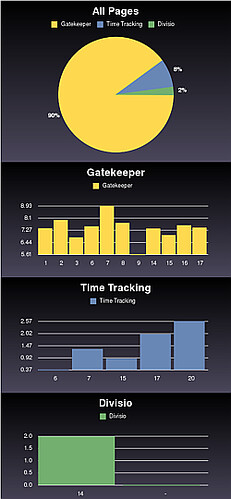
Graphs with Gruff

class GraphController < BaseTimeController
   def pages
      g = Gruff::Pie.new("500x350")
      g.title = "All Pages" 
      @current_user.pages.each do |page|
        g.data(page.title, [page.total]) 
      end
      send_data(g.to_blob, 
                :disposition => 'inline', 
                :type => 'image/png', 
                :filename => "timers.png")
    end
end

Pretty easy! Wasn’t it. Note the code above shows only the first of the graphs. Now if only I could find out how to set the minimum of the Bar chart to 0 instead of the minimum of the serie. Any help is appreciated?

Posted by Daniel Wanja Mon, 20 Feb 2006 12:10:00 GMT


Comments

  1. topfunky about 1 month later:
    Setting minimums is in svn now and will be released in a few days.
  2. Daniel Wanja about 1 month later:
    Awesome, thanks man. The solution from the source ;-) I checked it out and it now works as advertised, just add g.minimum_value = 0 to the Gruff::Bar before rendering it (g.to_blob). (Now if just find out how to enable 'textile' for the comments I would post the results here rather than creating a new blog entry!)
  3. joseph 6 months later:

    How can I changed the pie label text size

  4. Daniel Wanja 6 months later:

    Font sizes can be generaly changed as follows

          g = Gruff::Pie.new("500x350")
          g.title = "All Projects" 
          g.legend_font_size = 12
          g.marker_font_size = 12
          g.title_font_size = 14

    However the PieChart has a fixed size for the marker_font_size. This is maybe the issue you have.

      @d.pointsize = scale_fontsize(20)

    I haven’t checked if there was any change lately in the Gruff graph. If not then your are stuck with the predefined font size for the markers, unless you fix the Pie chart implementation.

    Now if anyone knows better, please let me know.

    Hope this helps.