Mapping Rails Errors to Flex Fields.
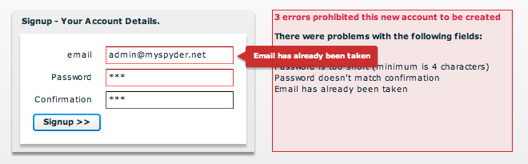
We extended the com.wheelerstreet.utils.ValidatorForm to add support for Rails Errors. Saving a form is a two step process. First, client side validation, the Signup button only gets enabled if the form is valid from a client side point of view. Step 2, server side validation, the user press the signup button and invokes the Rails UserController#create method
class UsersController < ApplicationController
def create
@user = User.new(params[:user])
respond_to do |format|
if @user.save
self.current_user = @user
format.xml { head :created }
else
format.xml { render :xml => @user.errors.to_xml(:dasherize => false) } end
end
end
endIf saving the user fails then Rails return the xml version of the errors:
@user.errors.to_xml(:dasherize => false)
Now we need a generic way to deal with these errors. We created the Flex RailsErrors class to manage the returned xml. And we created the RailsValidationForm that extends the com.wheelerstreet.utils.ValidatorForm. The RailsValidationForm class can be bound to a RailsErrors instance. So the result handler of the Flex Cairngorm Flex SignupCommand we just set the errors on the model locatorL
var errors:RailsErrors = new RailsErrors(data.result as XML); MySpyderModelLocator.getInstance().signupErrors = errors;
The signup.mxml page contains the following signup form
<mx:Canvas
xmlns:mx="http://www.adobe.com/2006/mxml"
xmlns:rails="org.onrails.rails.*"
>
<mx:Panel x="162" y="64" title="Signup - Your Account Details.">
<!-- Instance of org.onrails.rails.RailsValidationForm -->
<rails:RailsValidationForm
id="submitForm"
defaultButton="{signupButton}"
validators="{validators}"
fieldMap="{{Email:email, Password:password}}"
railsErrors="{MySpyderModelLocator.getInstance().signupErrors}"
x="98" y="89">
<mx:FormItem label="email">
<mx:TextInput id="email" />
</mx:FormItem>
<mx:FormItem label="Password">
<mx:TextInput id="password" displayAsPassword="true" />
</mx:FormItem>
<mx:FormItem label="Confirmation">
<mx:TextInput id="passwordConfirmation" displayAsPassword="true" />
</mx:FormItem>
<mx:Button id="signupButton" label="Signup >>" click="signup()" enabled="{MySpyderModelLocator.getInstance().signupButtonEnabled}"/>
</rails:RailsValidationForm>
</mx:Panel>
<rails:RailsErrorBox x="487" y="64" width="301" height="178"
errorMessage="errors prohibited this new account to be created"
errors="{MySpyderModelLocator.getInstance().signupErrors}"
visible="{MySpyderModelLocator.getInstance().signupErrors && MySpyderModelLocator.getInstance().signupErrors.hasErrors()}"
/>
</mx:Canvas>The RailsErrorBox just displays the text of all error messages and is only visible if there are any Rails errors.
Now all the magic happens in the org.onrails.rails.RailsValidationForm railsErrors setter.
public function set railsErrors(errors:RailsErrors):void {
_railsErrors = errors;
if (_railsErrors==null || !_railsErrors.hasErrors()) {
resetErrors();
} else {
for each (var field:String in _railsErrors.fields) {
if (_fieldMap[field])
_fieldMap[field].errorString = field + ' ' + _railsErrors.getFieldErrors(field).join(', ');
}
}
}The key is to associate the Rails error message with the field is simply to set the errorString on the field.
I just created this code this morning at breakfast so it’s really a work in progress. For instance it doesn’t support Rails attributes that are more than one word. But this goes hand in hand with the ActiveResourceClient and can be useful I hope to others trying to integrate Rails and Flex. So we will create a Google project and post the RailsErrors and RailsValidationForm.
The observer also disapeared, so here i try again with textile… [crossing fingers]
I set up my rails models with validations.
I then call a save! in my service (as this throws an error). This error triggers the Fault method in my cairngorm command:
public function fault(info:Object):void { try{ var i:FaultEvent = FaultEvent(info); PoolManModel.getInstance().serverValidationMessages = ArrayUtil.toArray(i.fault.faultString); } catch(error:Error) { Alert.show("ouch:" + error.message, "mas problemas"); } }The next part is a remote validator class:
Now, how do we make sure the doValidation is triggered?
I add an observer (thanks Alex Uhlmann) to my view, here you see them side by side:
What do you think?
Thanks for feedback. I will have to play with that as I was strungling finding how to trigger a Fault and pass information back to the Flex app. So maybe thats the anwser. I will play with it once I am back from the 360Flex conference.
This is a Flex-only solution, however, because the Rails server sends a 200/OK status code even when there is an error. Ideally, the Rails server would send the error messages in XML, as it is doing in this article, but also send an error status code such as 400/Bad-Request.
That way, the Rails server works with non-Flex clients.
Does anyone have a solution for sending non-success (non 2xx) status codes to Flex along with error messages?
Nice work. I don’t seem te be able to find the RailsErrors class though. Is it possible to post it also. Thanks.
Hi Herman,
You can get the RailsErrors class here http://nouvelles-solutions.com/onrails/activeresourceclient/ActiveResourceClient.zip
This zip file contains the following files:
ActiveResourceClient.mxml
FixtureResource.as
RailsErrorBox.mxml
RailsErrors.as
RailsValidationForm.as
Use at your own risk ;-)
The wheelerstreet article link is broken. Any chance of that bieng archived somewhere?
The original article was on http://blog.wheelerstreet.com/?p=123. There is a Flex demo application in the article on which you can do a view source. The source is visible here http://blog.wheelerstreet.com/code/formValidator/srcview/index.html