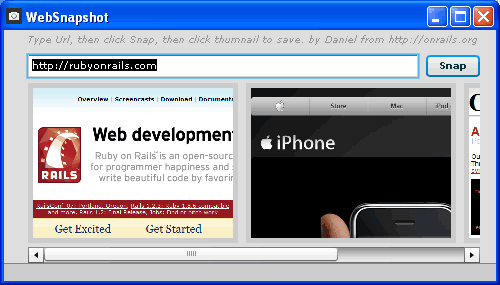
WebSnapshot - a simple Adobe AIR application.

UPDATE: new version can be found here


I converted the original Apollo WebSnapshot Application to Adobe AIR using FlexBuilder 3. Now WebSnapshot works on OSX and Windows.

The conversion was straight forward. I changed the root tag of the application from

to

Then I used the new File.browseForSave method to show the save dialog when clicking on the thumbnail. No need anymore for the workaround that was required for this before. One thing I didn’t find out (yet) is how to set the file type and default filename in the save dialog. Any pointer is welcome!

Download it now: WebSnapshot0.2.air (right click and ‘Download Linked File’)
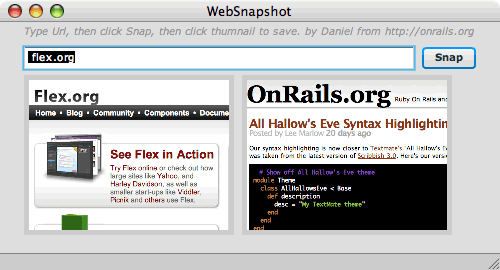
20070613_websnapshot_osx.gif

20070613_websnapshot.gif

To run the application you need to Adobe Integrated Runtime (AIR). Also uninstall Alpha 1 before installing Beta 1 if you had Apollo installed.

To uninstall the runtime on Windows:

1. In the Windows Start menu, select Settings > Control Panel. 2. Select the Add or Remove Programs control panel. 3. Select “Adobe Apollo 1.0 Alpha1” to uninstall the Apollo runtime. 4. Click the Change/Remove button.

To uninstall the runtime on Macintosh:

1. Delete the /Library/Frameworks/Adobe Apollo.framework directory. 2. Delete the /Library/Receipts/Adobe Apollo.pkg file. 3. Empty the Trash.

Posted by Daniel Wanja Wed, 13 Jun 2007 23:46:00 GMT


Comments

  1. underyang@yahoo.com about 10 hours later:

    Could you share the source?

  2. flanture about 10 hours later:

    To see inside air file just change extension to zip.

  3. Daniel Wanja about 14 hours later:

    Inside the .air file, which is a zip like flanture mentioned, you will only find the compiled version not the sources. You can find most of the significant code in the original blog post, and I will also release the code with the next release (0.3). I will first ensure the save dialog gets populated with the default file name, replace the JPEGEncoder with the one provided by Flex 3 (mx.graphics.codec.JPEGEncoder ).

  4. uyang 1 day later:

    COOL,THANKS

  5. Red Head about 1 month later:

    Looks nice!
    I’m also building an air app where the user can save a file and i have the same problem:
    How to set the default filename when using the browseforsave()

  6. Yang 7 months later:

    Inside the .air file, which is a zip like flanture mentioned, you will only find the compiled version not the sources. You can find most of the significant code in the original blog post, and I will also release the code with the next release (0.3). I will first ensure the save dialog gets populated with the default file name, replace the JPEGEncoder with the one provided by Flex 3 (mx.graphics.codec.JPEGEncoder ).

  7. MGM 7 months later:

    I can’t seem to get it to initialize, I get a memory runtime error in Windows XP every time. Please feel free to e-mail me at my given address if you know how to fix it. Thank you

  8. Emo 8 months later:

    I like this small Adobe Air Applications, some of them are really useful. Like this.

    Thanks!

  9. Alexander Evans 9 months later:

    This is really great, I prefer it over Silverlight currently. Thanks for throwing some Air Applications in already, very appreciated.

  10. קידום אתרים 10 months later:

    Inside the .air file, which is a zip like flanture mentioned, you will only find the compiled version not the sources. You can find most of the significant code in the original blog post, and I will also release the code with the next release (0.3). I will first ensure the save dialog gets populated with the default file name, replace the JPEGEncoder with the one provided by Flex 3 (mx.graphics.codec.JPEGEncoder ).

  11. Sid_M 11 months later:

    After playing around, I stumbled on hot set defaults for browseForSave(). Set the file object’s path to what you want as the default, and that will be respected by the dialog box. Like this:

    file = File.documentsDirectory.resolvePath(“mySubDirectories/myDefaultFilename.ext”);

    That’s it.

  12. Cayman 12 months later:

    Like Daniel Wanja already commented you’ll only find the compiled sorces. For decompiling I often use a tool named “CreezyFile” >> it’s great. I can recommend it.

    Nice blog, by the way :)

  13. Flex Resources over 1 year later:

    Great list of Flex Resources at:
    http://www.flexbasics.com

  14. http://www.myairapplications.com almost 2 years later:

    great applications.. maybe it would be on my list. thanks..