iPhone SDK - first 5 minutes.
Off course I couldn’t resist, I had to give it a try. The sdk is a whopping 2GB download and 5.6 Gb install. It installs all the developers tools, java, gcc4.2, WebObjects, the kitchen sink. Upon successful installation the system needs to be restarted.
Start XCode and select ‘New Project…’ from the File menu.
You can then select from 3 type of iPhone Applications
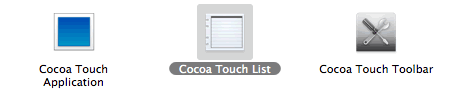
Let’s try the Cocoa Touch List and I name my test project TimeList.
This creates a standard XCode project:
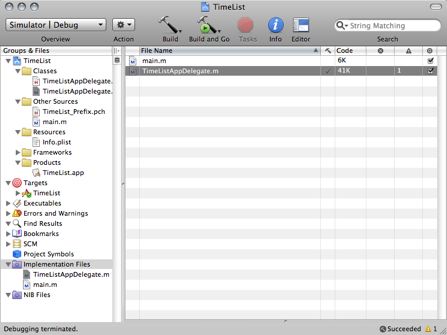
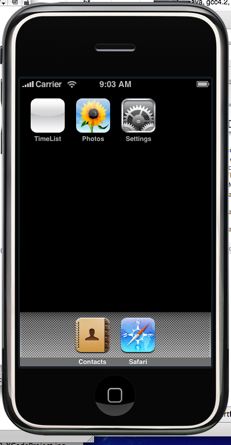
I clicked “Build and Go”…the application is compiled and linked after 20 seconds got an emulate iPhone with the TimeList app visible:
Clicking on it we get a pre-populated list of timezones which behaves just like an iPhone:
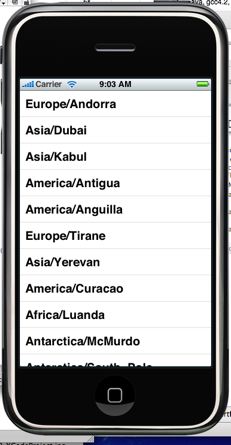
Note the emulator application is called Aspen Simulator, it has a ‘Hardware’ menu that should allow to rotate the UI but that doesn’t seem to work. The emulator really feels like an iPhone, all the finger gestures can be done with the mouse and the UI behaves like an iPhone. Pretty cool.
Let’s look at the TimeListAppDelegate generated code:
//
// TimeListAppDelegate.m
// TimeList
//
// Created by Daniel Wanja on 3/7/08.
// Copyright MyCompanyName 2008. All rights reserved.
//
#import “TimeListAppDelegate.h”
@implementation TimeListAppDelegate
@synthesize window;
@synthesize tableView;
- init {
if (self = [super init]) {
// Your initialization code here
}
return self;
}
- (void)applicationDidFinishLaunching:(UIApplication *)application {
// Create window
self.window = [[[UIWindow alloc] initWithFrame:[[UIScreen mainScreen] bounds]] autorelease];
// Set up table view
tableView = [[UITableView alloc] initWithFrame:[[UIScreen mainScreen] applicationFrame] style:UITableViewStylePlain];
tableView.delegate = self;
tableView.dataSource = self;
[window addSubview:tableView];
[window makeKeyAndVisible];
[tableView reloadData];
}
- (void)dealloc {
[tableView release];
[window release];
[super dealloc];
}
- (NSInteger)numberOfSectionsInTableView:(UITableView *)tableView {
return 1;
}
- (NSInteger)tableView:(UITableView *)tableView numberOfRowsInSection:(NSInteger)section {
return [[NSTimeZone knownTimeZoneNames] count];
}
- (UITableViewCell *)tableView:(UITableView *)tableView cellForRowAtIndexPath:(NSIndexPath *)indexPath withAvailableCell:(UITableViewCell *)availableCell {
UISimpleTableViewCell *cell = nil;
if (availableCell != nil) {
cell = (UISimpleTableViewCell *)availableCell;
} else {
CGRect frame = CGRectMake(0, 0, 300, 44);
cell = [[[UISimpleTableViewCell alloc] initWithFrame:frame] autorelease];
}
cell.text = [[NSTimeZone knownTimeZoneNames] objectAtIndex:[indexPath row]];
return cell;
}
@end
Looks like I have lots to read about before I can start changing that application. From what I can decipher once the application is initialized a UITableView is created and the delegate of the table view becomes the TimeListAppDelegate whish implements the numberOfRowsInSection and cellForRowAtIndexPath methods which uses the NSTimeZone knowTimeZonesNames as data source.
That was my first 5 minutes with the SDK. More to follow…now I have to go back to work :-( Next thing I will try out is the Interface Builder…stay tuned.
Enjoy!
Daniel.
Daniel Wanja
HTML5, iOS and Ruby On Rails Nouvelles Solutions, Inc.
d@n-so.com

